Гид · ChatGPT · сентябрь 2026
Слеш-команды для картинок в ChatGPT: 105 кодов и словарь
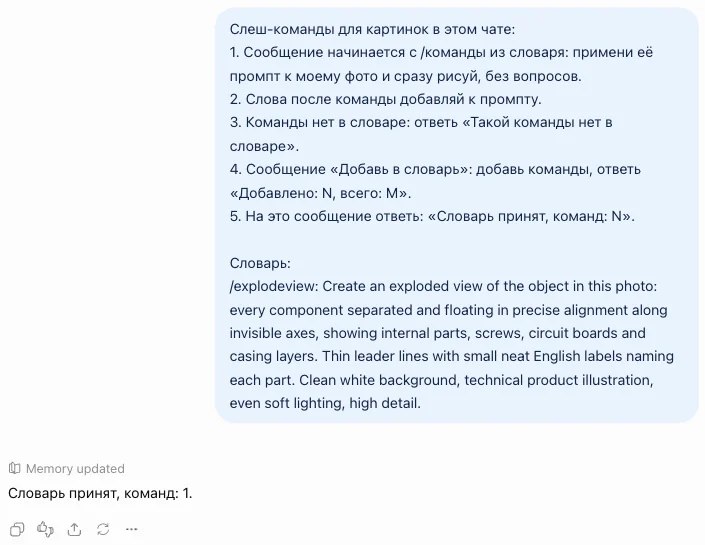
Встроенных слеш-команд для картинок в ChatGPT нет: «/» открывает меню настроек, а «/bts» пустой чат не поймёт. Работают они через словарь, где под коротким словом стоит промпт, и ниже такой словарь на 105 команд. Открой chatgpt.com, начни новый чат и отправь блок:
Слеш-команды для картинок в этом чате:
1. Сообщение начинается с /команды из словаря: примени её промпт к моему фото и сразу рисуй, без вопросов.
2. Слова после команды добавляй к промпту.
3. Команды нет в словаре: ответь «Такой команды нет в словаре».
4. Сообщение «Добавь в словарь»: добавь команды, ответь «Добавлено: N, всего: M».
5. На это сообщение ответь: «Словарь принят, команд: N».

Словарь:
/explodeview: Create an exploded view of the object in this photo: every component separated and floating in precise alignment along invisible axes, showing internal parts, screws, circuit boards and casing layers. Thin leader lines with small neat English labels naming each part. Clean white background, technical product illustration, even soft lighting, high detail.
Потом приложи фото плюсом слева от поля и напиши /explodeview
Не держи словарь в голове и не ищи команды в меню: они живут только в том чате, куда ты вставил шапку. Закрепи этот чат и добавляй туда категории из списка ниже по мере надобности. Команда пишется первой строкой сообщения, фото прикладывается плюсом слева от поля
Как понять, что команда сработала
Признак один: на команду приходит картинка, а не текст. Сначала чат подтверждает словарь строкой «Словарь принят, команд: N». Дальше на каждый блок «Добавь в словарь» приходит «Добавлено: N»: это число сверяй с числом команд в блоке, так видно, что блок дошёл целиком
Потом прикладываешь фото и пишешь одну команду. Никаких пояснений от чата не будет, сразу картинка:
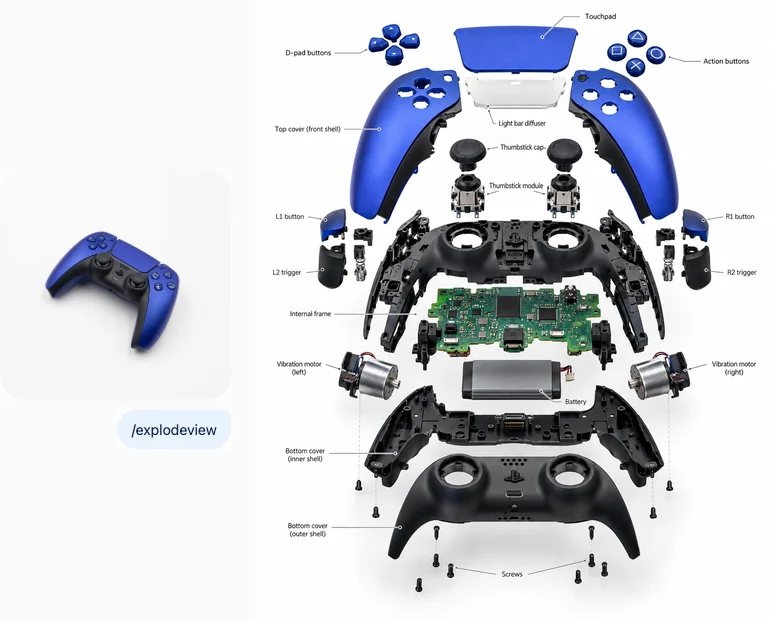
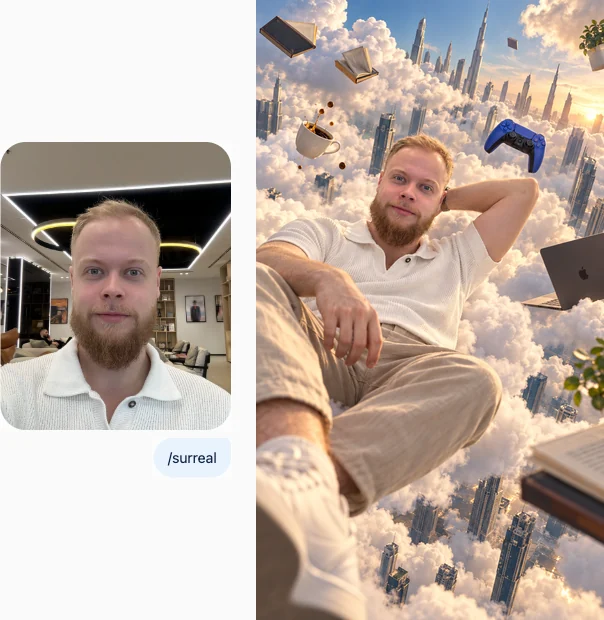
Прогон 24.09.2026 в веб-версии ChatGPT на своём аккаунте, тариф Go: словарь принят за 7-10 секунд, картинка по /explodeview через 60 секунд, по /surreal через 56 секунд, обе с первой попытки. Короткую шапку из статьи проверил отдельным новым чатом: /explodeview снова разобрал геймпад. Вход: фото геймпада из Wikimedia Commons (CC0) и мой портрет.
Как добавить остальные 104 команды
Скопируй блок нужной категории ниже и отправь в тот же чат отдельным сообщением. Каждый блок начинается словами «Добавь в словарь», по ним чат понимает, что это пополнение, а не просьба нарисовать. В ответ придёт строка со счётом, у меня блок товаров и сюрреализма дал «Добавлено: 25». Можно вставить несколько блоков одним сообщением
Все 105 имён я по одному набрал в поле ввода и смотрел, не откроется ли меню ChatGPT. Одно открыло: на «/comic» выскакивал пункт Personalization, поэтому в словаре она называется /comicpanel. Остальные 104 чистые
Если словарь нужен в каждом новом чате
Словарь работает только в том чате, куда его вставили. Память ChatGPT его не переносит: на шапку чат ответил плашкой «Memory updated», а в новом чате на «/bts» пришло «Такой команды нет». Правило запомнилось, сами команды нет. Три варианта под три случая:
| Твой случай | Что сделать |
|---|---|
| Хватает одного рабочего чата | закрепи чат со словарём: наведи на него в списке чатов слева, рядом с названием появится кнопка Pin. Возвращайся в него за каждой картинкой |
| Нужен чистый чат под каждую задачу | заведи проект: в боковом меню Projects, кнопка New project, потом три точки и Project settings. В поле инструкций вставь шапку и нужные блоки. По справке OpenAI инструкции проекта работают во всех его чатах |
| Хочешь команды в личных настройках | не выйдет целиком: на тарифах Free и Go в пользовательские инструкции влезает 1500 знаков, а словарь из 105 команд весит больше 26 тысяч знаков. Туда влезают правила из шапки и примерно три команды |
Путь с проектом я описываю по справке OpenAI, свой прогон шёл в обычном чате. Чат со словарём можно и перенести в проект: в том же меню на «/» есть пункт Move to project
Что ломается и что делать
Всё ниже поймано в прогоне, экранный текст дословный. Первое, что видит каждый, кто набирает слеш:
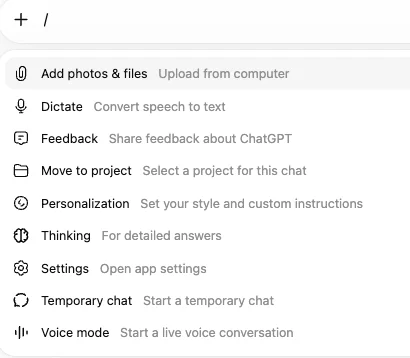
| Что видишь | Почему | Что сделать |
|---|---|---|
| Набрал «/», и под полем выскочило меню: Add photos & files, Dictate, Thinking, Temporary chat и ещё пять пунктов | это меню самого ChatGPT, оно открывается на любой слеш | печатай имя дальше: на полном имени команды из словаря меню закрывается. Не закрылось, значит, имя совпало с пунктом меню, как было у /comic |
| На команду пришло «Такой команды нет» | ты в новом чате, словаря в нём нет | вернись в чат со словарём или вставь шапку заново |
| На шапку с одной командой пришло «Словарь принят, команд: 6», на блок из четырёх «Добавлено: 4, всего: 10» | память ChatGPT подмешала команды из прошлых чатов, где я вставлял словарь | сверяй только «Добавлено»: оно считает текущий блок. Картинка по /explodeview в том чате пришла как обычно |
| В картинке появился предмет из прошлой команды | чат помнит прошлые картинки: в /surreal у меня прилетел геймпад из /explodeview | для чистого результата начни новый чат и вставь словарь, прошлых картинок там нет |
Не пришло вообще ничего, а в чате надпись про лимит: команда ни при чём, на бесплатном тарифе картинок в день мало. Сколько и когда сбрасывается, разобрал в гиде про лимиты ChatGPT
Пять команд из ролика
Те самые пять из ролика. /explodeview уже стоит в шапке, остальные четыре добавь блоком ниже
| Команда | Что делает |
|---|---|
/bts | кадр из фильма превращается в фото со съёмочной площадки: камеры, свет, съёмочная группа |
/adcreative | фото товара превращается в рекламный постер с коротким слоганом |
/explodeview | предмет разбирается на детали в воздухе, у каждой детали подпись |
/impossibleangle | та же сцена снята снизу, будто камера лежит на земле |
/surreal | человек с фото парит среди облаков между небоскрёбами |
Скопируй блок и отправь в чат со словарём:
Добавь в словарь слеш-команд:
/bts: Turn this image into a behind-the-scenes photo from the set where it was made. Keep the same people, costumes and main scene recognizable, but pull the camera back to reveal the production around them: film crew, cameras on dollies, boom microphones, light stands, cables and monitors. Candid documentary photo, practical set lighting, realistic, 35mm, slight film grain.
/adcreative: Turn the product in this photo into a premium advertising poster. Keep the product's exact shape, colors, logos and details. Place it in a clean studio scene with dramatic lighting and soft reflections, generous negative space, a short bold English headline of up to 4 words that fits the product and a small tagline. Commercial magazine photography, sharp focus, 4:5.
/impossibleangle: Re-shoot this scene from an impossible camera angle: extreme worm's-eye view from directly below, as if the camera lay on the ground under the subject, strong wide-angle perspective, subject towering against the sky. Keep the same people, clothes, animals and colors recognizable. Photorealistic, bright natural light.
/surreal: Place the person from this photo into a surreal dreamlike scene: they float calmly in mid-air among giant soft clouds between city skyscrapers, with impossible scale and a few floating objects around. Keep the face, hairstyle and outfit exactly the same. Photorealistic surrealism in the spirit of René Magritte, soft cinematic light, high detail.
Товар и реклама: 15 команд
Фото товара с телефона превращается в картинку для карточки, поста или рекламы. Форма, цвет и логотип в каждом промпте закреплены: «Keep the product exactly as it is»
| Команда | Что делает |
|---|---|
/packshot | чистое фото товара на белом фоне, как в каталоге |
/lifestyle | товар в жизни: в руках, на столе, в деле |
/flatlay | раскладка сверху: товар и подходящие предметы вокруг |
/levitate | товар парит в воздухе, вокруг летают его части или ингредиенты |
/splash | товар в брызгах воды или сока, застывших в воздухе |
/billboard | товар на рекламном щите в городе |
/unboxing | руки открывают коробку с товаром, вид сверху |
/marketplace | карточка для маркетплейса: крупный товар и три выноски с плюсами |
/luxury | дорогая реклама: чёрный бархат, золотой контровой свет |
/minimalad | минималистичная реклама: один цвет фона и мягкая тень |
/podium | товар на геометрическом подиуме, как в студийной витрине |
/inhand | товар крупно в руке, естественный свет |
/magazine | обложка журнала, где товар главный герой |
/seasonal | товар в сезонной сцене: зима, лето или праздник по твоему слову |
/mockup | логотип или принт с фото на футболке, кружке и сумке |
Скопируй блок и отправь в чат со словарём:
Добавь в словарь слеш-команд:
/packshot: Turn the product in this photo into a clean e-commerce packshot: pure white seamless background, the product centered and filling about 70% of the frame, soft even studio light, a subtle natural shadow underneath. Keep the exact shape, colors, labels and logos. Sharp focus, 1:1.
/lifestyle: Show the product from this photo being used in a real everyday scene that fits what it is, in a bright modern home or street setting, with a person's hands or a person in soft focus. Keep the product exactly as it is. Natural window light, lifestyle photography, shallow depth of field.
/flatlay: Create a top-down flat lay with the product from this photo in the center and 6-8 matching props arranged neatly around it on a textured surface. Keep the product exactly as it is. Soft daylight, balanced composition, color palette taken from the product, 1:1.
/levitate: Make the product from this photo levitate in mid-air against a clean gradient background, with its ingredients, parts or related small objects floating around it. Keep the product exactly as it is. Dynamic but tidy composition, crisp studio light, commercial 3D-look photography.
/splash: Place the product from this photo in a dramatic liquid splash frozen in time, with droplets and waves around it in a color that suits the product. Keep the product exactly as it is and fully visible. High-speed studio photography, dark or colored background, sharp detail.
/billboard: Show the product from this photo as a large advertisement on a billboard in a busy modern city street at dusk, with people and cars below for scale. Keep the product exactly as it is on the billboard. Realistic street photography, city lights starting to glow.
/unboxing: Create an unboxing scene: two hands opening a neat branded box on a clean table, the product from this photo resting inside on soft paper. Keep the product exactly as it is. Top-down view, soft daylight, calm premium feel.
/marketplace: Design a marketplace product card from this photo: the product large on a clean light background, three short feature callouts with simple icons pointing to it, labels in Russian, modern sans-serif font, plenty of space. Keep the product exactly as it is. Vertical 3:4.
/luxury: Turn the product from this photo into a luxury advertising shot: deep black velvet background, a thin golden rim light outlining the product, soft reflections on a dark glossy surface, lots of negative space. Keep the product exactly as it is. High-end commercial photography.
/minimalad: Create a minimalist ad with the product from this photo on a single pastel background color that matches it, one long soft shadow, nothing else in the frame. Keep the product exactly as it is. Clean studio light, calm and airy, 4:5.
/podium: Place the product from this photo on a geometric podium made of stone, glass and matte shapes in a soft studio set, with a couple of plants or props in the same palette. Keep the product exactly as it is. Soft directional light, gentle shadows, product photography.
/inhand: Show the product from this photo held in one hand, close-up, against a softly blurred everyday background. Keep the product exactly as it is and the hand natural with correct fingers. Natural daylight, authentic social media photo, sharp focus on the product.
/magazine: Design a glossy magazine cover with the product from this photo as the hero: big masthead title at the top, two or three short cover lines, bold editorial layout. Keep the product exactly as it is. Studio lighting, vertical 3:4.
/seasonal: Place the product from this photo in a seasonal scene. Use the season or holiday I write after the command; if none, use winter holidays with warm lights and soft snow. Keep the product exactly as it is and the main focus. Cozy commercial photography.
/mockup: Take the logo or artwork from this photo and place it on a set of realistic mockups arranged in one image: a t-shirt, a mug, a tote bag and a phone case. Keep the artwork exactly as it is. Neutral studio background, soft light, clean product presentation.
Портрет и люди: 15 команд
Под своё фото или фото героя. В каждом промпте стоит просьба сохранить лицо, но нейросеть иногда всё равно его меняет: сравни с исходником, прежде чем публиковать
| Команда | Что делает |
|---|---|
/headshot | деловой портрет для профиля: пиджак, нейтральный фон |
/studio | студийный портрет на однотонном фоне со светом софтбокса |
/cineportrait | портрет как кадр из кино: тёплые и бирюзовые тона |
/editorial | модный портрет для глянцевого журнала |
/blackwhite | контрастный чёрно-белый портрет |
/goldenhour | портрет на улице в закатном солнце |
/speaker | ты на сцене конференции с микрофоном и большим экраном |
/podcast | ты в студии подкаста у микрофона |
/oldmoney | образ «старые деньги»: спокойная дорогая одежда и загородный фон |
/polaroid | снимок на полароид со вспышкой и белой рамкой |
/ageup | тот же человек на 30 лет старше |
/younger | тот же человек на 20 лет моложе |
/actionfigure | ты в виде коллекционной фигурки в упаковке |
/caricature | добрый шарж: большая голова, узнаваемые черты |
/toon | ты как герой 3D-мультфильма |
Скопируй блок и отправь в чат со словарём:
Добавь в словарь слеш-команд:
/headshot: Turn this photo into a professional business headshot: the same person in a neat dark blazer, neutral light gray background, soft studio light, shoulders and head in frame, friendly confident look into the camera. Keep the face and identity exactly the same. Photorealistic, 1:1.
/studio: Re-create this person as a studio portrait on a seamless colored paper backdrop, lit with a large softbox from one side and gentle fill. Keep the face, hair and identity exactly the same. Medium shot, calm pose, high-end portrait photography.
/cineportrait: Turn this photo into a cinematic portrait that looks like a still from a movie: moody teal and orange color grade, soft haze, shallow depth of field, anamorphic feel. Keep the face and identity exactly the same. Photorealistic, 16:9.
/editorial: Re-create this person in a fashion editorial shoot for a glossy magazine: stylish outfit that suits them, confident pose, clean bold set design, crisp studio light. Keep the face and identity exactly the same. Photorealistic, vertical 4:5.
/blackwhite: Turn this photo into a dramatic black and white portrait with deep blacks, bright highlights and visible skin texture, lit by a single hard light from the side. Keep the face and identity exactly the same. Classic fine-art portrait photography.
/goldenhour: Place this person outdoors at golden hour: warm low sun behind them creating a soft glowing rim on the hair, blurred nature or city background. Keep the face, clothes and identity exactly the same. Photorealistic portrait, natural and relaxed.
/speaker: Place this person on stage at a large conference: holding a microphone, speaking to an audience, a big screen glowing behind them, stage lights. Keep the face and identity exactly the same. Event photography from the audience, realistic.
/podcast: Place this person in a cozy podcast studio: seated at a desk with a professional microphone on an arm, headphones, warm practical lamps and acoustic panels behind. Keep the face and identity exactly the same. Photorealistic, 16:9.
/oldmoney: Re-create this person in an old money aesthetic: quiet luxury clothing in cream, navy and camel tones, a classic country estate or yacht club background, relaxed posture. Keep the face and identity exactly the same. Soft natural light, film-like photo.
/polaroid: Turn this photo into an instant Polaroid snapshot: direct on-camera flash, slightly faded colors, soft vignette and the classic white frame with a thicker bottom border. Keep the people and identity exactly the same. Authentic analog look.
/ageup: Show the same person from this photo 30 years older: natural aging of skin and hair, same face shape, same eyes and identity, same pose and clothing style. Photorealistic portrait, soft light, respectful and natural.
/younger: Show the same person from this photo 20 years younger: younger skin and hair, same face shape, eyes and identity, same pose and clothing style. Photorealistic portrait, soft light, natural result.
/actionfigure: Turn the person in this photo into a collectible action figure inside a clear plastic blister package with a printed cardboard back, with 3-4 small accessories that fit them in separate slots. Keep the face and outfit recognizable. Product photo of a toy, studio light.
/caricature: Draw a friendly caricature of the person in this photo: slightly bigger head, exaggerated but kind features, recognizable face, simple colorful background. Clean digital illustration, warm and funny, not mean.
/toon: Turn the person in this photo into a 3D animated movie character: stylized proportions, big expressive eyes, soft skin shading, same hairstyle, outfit colors and recognizable features. Colorful cinematic lighting, family animation look.
Ракурсы и камера: 15 команд
Та же сцена, будто её переснял оператор с другой точки. Лучше всего работает на фото, где понятно, что вокруг
| Команда | Что делает |
|---|---|
/topdown | та же сцена строго сверху |
/drone | вид с дрона высоко над местом |
/closeup | макро: одна деталь во весь кадр |
/wideangle | очень широкий план: объект маленький, вокруг много места |
/dutch | наклонённая камера, тревожный кадр как в триллере |
/overshoulder | кадр из-за плеча человека |
/pov | вид от первого лица, видны твои руки |
/fisheye | съёмка рыбьим глазом, круглое искажение |
/tiltshift | эффект игрушечного макета: мир кажется миниатюрой |
/backview | та же сцена со спины |
/profile | строгий вид сбоку, профиль |
/lowangle | героический ракурс снизу, объект выглядит мощно |
/reflection | сцена в отражении: в луже, зеркале или витрине |
/framed | съёмка сквозь предмет на переднем плане: окно, листья, арку |
/motionblur | проводка: объект резкий, фон смазан скоростью |
Скопируй блок и отправь в чат со словарём:
Добавь в словарь слеш-команд:
/topdown: Re-shoot this scene from directly above, a perfect top-down bird's-eye view, with everything arranged as it would look from the ceiling. Keep the same people, objects and colors recognizable. Photorealistic, even light.
/drone: Re-shoot this scene as an aerial drone photo from high above, showing the surroundings, roads and landscape around the subject, the subject small but clearly visible. Keep the setting recognizable. Photorealistic, crisp daylight.
/closeup: Create an extreme macro close-up of the most interesting detail of this photo: fine texture, tiny particles, very shallow depth of field with creamy blur. Keep colors and materials the same. Macro photography, sharp focus on the detail.
/wideangle: Re-shoot this scene as an ultra-wide establishing shot: pull far back so the subject is small in a big environment that fits the scene, strong sense of space. Keep the subject recognizable. Photorealistic, cinematic composition.
/dutch: Re-shoot this scene with a dramatic Dutch angle: the camera tilted about 25 degrees, creating tension like in a thriller movie. Keep the same people, objects and colors. Photorealistic, moody contrasty light.
/overshoulder: Re-shoot this scene as an over-the-shoulder shot: a person's shoulder and back of the head blurred in the foreground, the main subject in focus beyond it. Keep the subject and setting recognizable. Cinematic photography, shallow depth of field.
/pov: Re-create this scene as a first-person point-of-view shot: we see it through the eyes of someone standing there, their hands visible at the bottom of the frame interacting with the subject. Keep the subject recognizable. Photorealistic, natural light.
/fisheye: Re-shoot this scene with a fisheye lens: strong circular distortion, the subject very close to the lens and bulging in the center, the environment curving around. Keep the subject recognizable. Photorealistic, playful energetic look.
/tiltshift: Turn this scene into a tilt-shift miniature photo: high viewpoint, a narrow band of sharp focus with strong blur above and below, slightly boosted colors so everything looks like a tiny toy model. Keep the scene recognizable.
/backview: Re-shoot this scene from behind the main subject, so we see their back and what they are looking at in front of them. Keep the same clothing, hair and setting recognizable. Photorealistic, natural light.
/profile: Re-shoot the main subject of this photo in a clean side profile view, turned exactly 90 degrees to the camera, with a simple background. Keep the identity, clothing and colors the same. Photorealistic, soft studio light.
/lowangle: Re-shoot this scene from a low heroic angle, the camera at knee height looking up, making the subject look strong and important against the sky or ceiling. Keep the subject recognizable. Photorealistic, dramatic light.
/reflection: Show this scene as a reflection: we see the subject mirrored in a rain puddle, a mirror or a shop window, with the real surface texture visible. Keep the subject recognizable. Photorealistic, atmospheric light.
/framed: Re-shoot this scene through a natural frame in the foreground, such as a window, an archway, leaves or a doorway, softly blurred, with the subject sharp in the middle. Keep the subject recognizable. Photorealistic, layered composition.
/motionblur: Re-shoot this scene as a panning shot: the subject sharp while the background is streaked with horizontal motion blur, conveying speed. Keep the subject recognizable. Photorealistic, dynamic action photography.
Стили и техники: 15 команд
Фото перерисовывается в другой технике, а композиция и узнаваемость остаются
| Команда | Что делает |
|---|---|
/anime | сцена в стиле японского аниме |
/watercolor | акварельный рисунок с подтёками |
/oilpainting | картина маслом с густыми мазками |
/pencil | карандашный набросок |
/comicpanel | страница комикса с облачками |
/pixel | пиксель-арт как в играх 90-х |
/clay | всё вылеплено из пластилина |
/bricks | сцена собрана из пластиковых кубиков-конструктора |
/origami | всё сложено из бумаги |
/vintage | фото как будто снято на плёнку в 70-х |
/synthwave | неон и закат 80-х |
/ukiyoe | японская гравюра на дереве |
/popart | поп-арт: яркие плашки и точки |
/lowpoly | 3D из крупных треугольников |
/stainedglass | витраж из цветного стекла |
Скопируй блок и отправь в чат со словарём:
Добавь в словарь слеш-команд:
/anime: Redraw this photo as a Japanese anime illustration: clean line art, cel shading, expressive eyes, vivid colors and a painted background. Keep the composition, people and key objects recognizable. High-quality anime key visual.
/watercolor: Repaint this photo as a watercolor painting: soft washes, visible paper texture, gentle bleeding edges and a few loose pencil lines. Keep the composition and subject recognizable. Light, airy palette.
/oilpainting: Repaint this photo as a classical oil painting on canvas: thick visible brush strokes, rich colors, dramatic chiaroscuro light like an old master. Keep the composition and subject recognizable. Museum-quality artwork.
/pencil: Redraw this photo as a detailed graphite pencil sketch on off-white paper: careful shading, cross-hatching, some construction lines left visible. Keep the composition and subject recognizable. Realistic hand-drawn look.
/comicpanel: Turn this photo into a comic book panel: bold ink outlines, halftone dots, flat vivid colors, dynamic composition and one short speech bubble. Keep the people and scene recognizable. Classic American comic style.
/pixel: Redraw this photo as retro pixel art: large visible square pixels, a limited 16-color palette, no anti-aliasing, like a 1990s video game scene. Keep the composition and subject recognizable.
/clay: Re-create this scene as a claymation set: everything sculpted from colorful plasticine with visible fingerprints and soft rounded shapes, lit like a stop-motion film. Keep the composition and subject recognizable.
/bricks: Re-create this scene built entirely from plastic toy construction bricks, with visible studs and blocky shapes, placed on a baseplate. Keep the composition, colors and subject recognizable. Toy product photography, shallow depth of field.
/origami: Re-create this scene as a paper craft diorama: every element folded and cut from colored paper, visible folds and layered paper depth. Keep the composition and subject recognizable. Soft studio light, macro photography.
/vintage: Turn this photo into a vintage 1970s film photograph: warm faded colors, soft grain, slight light leaks, rounded corners of an old print. Keep the people and scene recognizable. Authentic analog look.
/synthwave: Restyle this photo in synthwave style: neon pink and cyan glow, a retro sunset with horizontal stripes, a perspective grid floor, 1980s vibe. Keep the subject recognizable in the center. Digital art, glossy look.
/ukiyoe: Redraw this photo as a Japanese ukiyo-e woodblock print: flat areas of color, bold outlines, stylized waves or clouds, textured paper. Keep the composition and subject recognizable. Traditional Edo-period print style.
/popart: Turn this photo into a pop art print: bold flat colors, halftone dots, thick outlines, repeated in a 2x2 grid with different color schemes. Keep the subject recognizable in each tile. 1960s pop art gallery style.
/lowpoly: Re-create this scene in low poly 3D style: everything built from large flat triangles with simple gradients, clean geometric shapes and soft lighting. Keep the composition and subject recognizable.
/stainedglass: Turn this photo into a stained glass window: pieces of colored glass separated by dark lead lines, light shining through them. Keep the composition and subject recognizable. Photographed from inside a bright cathedral.
Сюрреализм: 10 команд
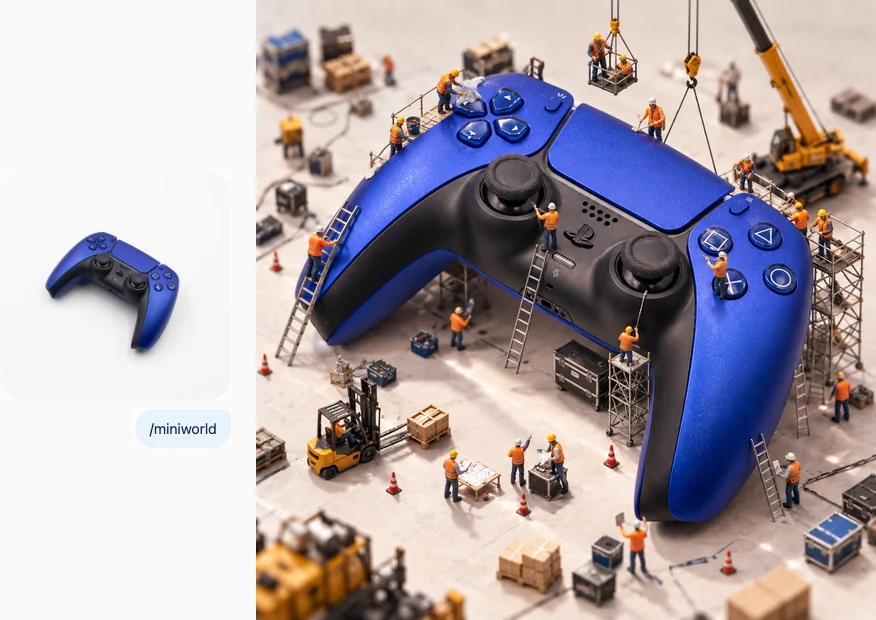
Картинки, которых не бывает в жизни. Сюда же попала /miniworld, которую я прогонял выше
| Команда | Что делает |
|---|---|
/miniworld | вокруг предмета копошатся крошечные рабочие на лесах |
/giant | объект стал гигантом посреди города |
/underwater | сцена ушла под воду |
/zerogravity | невесомость: всё в кадре парит |
/foldcity | город загибается вверх, как в фильме про сны |
/portal | в кадре открылся портал в другой мир |
/melting | предмет плавится, как на картинах Дали |
/glassify | предмет становится прозрачным стеклом |
/snowglobe | сцена внутри снежного шара |
/doubleexposure | двойная экспозиция: силуэт человека и пейзаж внутри |
Скопируй блок и отправь в чат со словарём:
Добавь в словарь слеш-команд:
/miniworld: Turn this photo into a miniature world scene: tiny workers on scaffolding, small cranes and ladders are building, cleaning or repairing the main object as if it were a giant structure. Keep the object exactly as it is. Tilt-shift macro photography, playful and detailed.
/giant: Place the main subject of this photo into a real city as a giant, towering over buildings and streets, tiny people and cars around it for scale. Keep the subject exactly as it is. Photorealistic, daylight, surreal scale.
/underwater: Move this scene underwater: soft blue light rays from the surface, floating bubbles, gently drifting hair and fabric, small fish passing by. Keep the subject and identity recognizable. Photorealistic underwater photography.
/zerogravity: Show this scene in zero gravity: the subject and every loose object gently floating in the air, hair and fabric drifting, small items suspended around. Keep the subject recognizable. Photorealistic, calm and dreamy.
/foldcity: Place the subject of this photo into a street where the city folds upward and bends over the sky like in a dream movie, buildings continuing upside down overhead. Keep the subject recognizable. Photorealistic, cinematic wide shot.
/portal: Add a glowing circular portal into this scene that opens to a completely different world, such as a jungle, space or an ocean, with light spilling out onto the subject. Keep the original scene and subject as they are. Photorealistic, magical light.
/melting: Make the main object of this photo melt and drip like in a Salvador Dali painting, draped over an edge in a quiet desert landscape with long shadows. Keep the object recognizable. Surrealist painting look, warm light.
/glassify: Re-create the main object of this photo as if it were made entirely of clear glass, with realistic refractions, caustic light patterns and soft reflections. Keep the exact shape. Studio product photography, dark gradient background.
/snowglobe: Place the whole scene from this photo inside a glass snow globe standing on a wooden table, tiny snowflakes floating inside, cozy blurred room behind. Keep the scene recognizable in miniature. Photorealistic macro photography.
/doubleexposure: Create a double exposure image: the silhouette of the main subject from this photo blended with a landscape of forest, mountains or city inside it, on a clean light background. Keep the profile recognizable. Artistic photography.
Кино и закулисье: 10 команд
Кадр превращается в сцену из фильма, афишу или съёмочный павильон. Пара к /bts из ролика
| Команда | Что делает |
|---|---|
/filmstill | фото как кадр из фильма с широкими полосами |
/movieposter | афиша фильма с названием и слоганом |
/storyboard | раскадровка из шести эскизов |
/redcarpet | ты на красной дорожке под вспышками |
/noir | нуар: чёрно-белый кадр с тенями от жалюзи |
/scifi | сцена из научной фантастики |
/western | сцена из вестерна |
/vhs | кадр с видеокассеты 90-х |
/greenscreen | та же сцена в павильоне с зелёным фоном |
/setmodel | макет декорации в миниатюре на столе художника |
Скопируй блок и отправь в чат со словарём:
Добавь в словарь слеш-команд:
/filmstill: Turn this photo into a still frame from a feature film: 2.39:1 widescreen with black bars, cinematic color grade, dramatic lighting and composition as if paused mid-scene. Keep the people and scene recognizable. Photorealistic.
/movieposter: Design a movie poster starring the subject of this photo: dramatic composition, a genre that fits the scene, a bold title in English at the bottom, a short tagline and small billing credits. Keep the face and identity recognizable. Vertical 2:3.
/storyboard: Turn this photo into a film storyboard sheet: six sequential panels drawn in rough pencil with gray marker shading, showing the scene before and after this moment, with small arrows for camera movement. Keep the subject recognizable.
/redcarpet: Place this person on a red carpet at a film premiere: photographers' flashes, a branded backdrop, elegant evening outfit that suits them, confident pose. Keep the face and identity exactly the same. Photorealistic event photography.
/noir: Re-create this scene as a film noir still: black and white, hard light through window blinds casting stripes of shadow, cigarette-style smoke haze, 1940s mood. Keep the people and composition recognizable.
/scifi: Move this scene into a science fiction movie: futuristic spaceship interior or neon future city, holographic displays, cool blue light. Keep the people, faces and main objects recognizable. Photorealistic blockbuster film still.
/western: Move this scene into a classic western movie: dusty frontier town, wooden saloon, warm sunset light, cowboy-era clothing that suits the people. Keep the faces and identity recognizable. Photorealistic film still with warm grain.
/vhs: Turn this photo into a frame from a 1990s VHS tape: soft blurry detail, color bleeding, horizontal tracking lines, a small date stamp in the corner. Keep the people and scene recognizable. Authentic home video look.
/greenscreen: Show how this scene would be filmed in a studio: the same subject standing in front of a green screen with tracking markers, studio lights and a camera crew around. Keep the subject and outfit exactly the same. Behind-the-scenes photo, realistic.
/setmodel: Turn this scene into a miniature film set model on a production designer's table: small handmade buildings and props, tiny figures, cutting mat, pencils and paper around. Keep the layout of the scene recognizable. Macro photography.
Схемы и инфографика: 10 команд
Для тех, кто объясняет предмет: как устроен, из чего состоит, как собрать. Подписи на схемах выходят по-английски, по-русски допиши после команды
| Команда | Что делает |
|---|---|
/blueprint | технический чертёж на синей бумаге |
/cutaway | предмет в разрезе: видно, что внутри |
/howitworks | инфографика «как это работает» со стрелками |
/manual | инструкция по сборке в картинках |
/knolling | все детали разложены ровными рядами под прямым углом |
/isometric | изометрическая 3D-схема, как в играх-стратегиях |
/scale | сравнение размера с привычными предметами |
/evolution | эволюция предмета по десятилетиям в ряд |
/anatomy | плакат-анатомия предмета с подписями |
/patent | старинный патентный рисунок |
Скопируй блок и отправь в чат со словарём:
Добавь в словарь слеш-команд:
/blueprint: Turn the object in this photo into a technical blueprint: white line drawing on deep blue paper, front, side and top views, dimension lines and small English annotations. Keep the object's real shape and proportions.
/cutaway: Show the object from this photo as a cutaway cross-section: one quarter removed to reveal the internal structure, layers and mechanisms, with small English labels. Keep the outer look exactly the same. Clean technical illustration, white background.
/howitworks: Create an infographic explaining how the object in this photo works: the object in the center, numbered arrows showing the process, 4-5 short labeled steps in Russian, simple icons. Clean flat design, light background, vertical 4:5.
/manual: Create a step-by-step assembly instruction sheet for the object in this photo: 4-6 numbered panels with simple black line drawings of parts and hands, arrows, no words, like a furniture manual. Keep the object's real shape.
/knolling: Create a knolling photo of the object from this photo: it is taken apart and all components are laid out in neat parallel rows at right angles on a clean flat surface. Keep the real parts and colors. Top-down view, even light.
/isometric: Turn this scene into an isometric 3D diagram: a small floating block of the scene seen at a 30-degree angle, clean shapes, soft shadows and a pastel palette. Keep the key objects and layout recognizable.
/scale: Create a size comparison image: the object from this photo placed next to familiar everyday items like a coin, a phone, a coffee cup and a hand, with simple measurement lines. Keep the object's real proportions. Clean light background.
/evolution: Show the evolution of the object in this photo across the decades: five versions from about 1950 to today in a row, left to right, with the year under each in small type. The last one is the object exactly as in the photo. Clean studio background.
/anatomy: Create a vintage anatomy poster of the object in this photo: a detailed illustration in the center with numbered callouts naming its parts in English, a decorative border and an aged paper texture. Keep the object's real shape.
/patent: Redraw the object from this photo as a vintage patent drawing: fine black ink lines on aged cream paper, numbered parts, figure labels like FIG. 1 and FIG. 2, patent-style layout. Keep the real shape of the object.
Еда, интерьер и места: 10 команд
Блюдо, комната или улица на фото превращаются в кадр для меню, объявления или поста
| Команда | Что делает |
|---|---|
/foodpro | блюдо как на профессиональной фуд-съёмке |
/restaurant | блюдо на столе в ресторане |
/interior | комната с фото после дизайнерского ремонта |
/realestate | фото для объявления о недвижимости: светло и просторно |
/nightcity | сцена переносится в ночной неоновый город |
/cozy | уютная сцена: плед, лампа, дождь за окном |
/travel | открытка из путешествия на фоне достопримечательности |
/fourseasons | одна и та же сцена в четырёх временах года |
/daynight | та же сцена ночью с огнями |
/moodboard | мудборд: цвета, фактуры и детали из фото |
Скопируй блок и отправь в чат со словарём:
Добавь в словарь слеш-команд:
/foodpro: Turn the food in this photo into professional food photography: styled on a beautiful plate, fresh garnish, a natural textured table, soft side light, shallow depth of field. Keep the dish recognizable. Appetizing magazine look.
/restaurant: Place the dish from this photo on a table in an elegant restaurant: candle light, glassware, a blurred warm dining room behind. Keep the dish exactly as it is. Photorealistic evening atmosphere.
/interior: Redesign the room in this photo as if for an interior design magazine: same layout, windows and doors, but new furniture, materials and styling in a modern warm minimal style, plants and soft daylight. Photorealistic interior photography.
/realestate: Turn this photo of a place into a bright real estate listing photo: wide angle, straight vertical lines, clean and tidy, balanced daylight, bright windows. Keep the real layout and features. Professional property photography.
/nightcity: Move the subject of this photo into a rainy night city street full of neon signs and reflections on wet asphalt. Keep the subject and identity recognizable. Cinematic photography, moody colorful light.
/cozy: Place the subject of this photo into a cozy home scene: soft blanket, warm lamp light, a cup of tea, rain on the window behind. Keep the subject recognizable. Warm, calm, photorealistic.
/travel: Place the subject of this photo in front of a famous landmark as a travel photo. Use the city I write after the command; if none, pick Paris. Keep the face and identity exactly the same. Bright daylight, natural tourist photo.
/fourseasons: Show the scene from this photo in four seasons in a 2x2 grid: spring, summer, autumn and winter, with the same viewpoint and composition in each. Keep the place and subject recognizable. Photorealistic.
/daynight: Show the same scene from this photo at night: dark blue sky, warm window and street lights on, same viewpoint and composition. Keep everything else recognizable. Photorealistic night photography.
/moodboard: Create a moodboard collage from this photo: 8-10 tiles with its main colors as swatches with hex codes, close-up textures, details and similar mood images, arranged in a clean grid on white. Designer presentation style.
Нужной команды нет: собери свою по той же форме, /имя: промпт на английском, и отправь блоком «Добавь в словарь». Имя проверь: набери его в поле и посмотри, не открылось ли меню. Промпты по стилям с нуля, без своего фото, лежат в 26 стилях для промпта картинки
Что ещё почитать
Хочешь понять, почему одни слова меняют картинку сильнее других: шесть промптов, которые перерисовывают твоё фото. Нужны фото со своим лицом в разных образах: 10 промптов нейрофото
Нужны команды не для картинок, а для текстовых ответов: 5 команд, которые пишут перед вопросом. Карточки для маркетплейса целиком, с текстом и инфографикой, разобраны в гиде по карточкам для WB и Ozon. Ни разу не получал картинку от нейросети: начни с пути от запроса до готового файла
Источники
Страницы открыты 24 сентября 2026 года, поведение чата снято собственным прогоном
- Projects in ChatGPT - справка OpenAI: New project, Project settings, инструкции проекта сильнее личных
- ChatGPT Custom Instructions - справка OpenAI: 1500 знаков на Free и Go, 5000 на платных тарифах
- Memory in ChatGPT - справка OpenAI о памяти между чатами
- GPTs in ChatGPT - справка OpenAI о своих GPT, ещё одном месте для инструкций
- ChatGPT slash commands explained - разбор, почему вирусные слеш-команды не встроены в ChatGPT
- DualSense Wireless Controller Cobalt Blue - фото геймпада для прогона, лицензия CC0
- Собственный прогон 24 сентября 2026 года в веб-версии ChatGPT: словарь, три команды, проверка 105 имён на меню

Памятка: пять строк, чтобы не открывать статью снова
Всё, что нужно при следующей картинке
Сохрани себе
- команды работают только в чате, куда вставлен словарь, в новом чате ответ «Такой команды нет»
- первое сообщение шапка, ответ «Словарь принят, команд: 1», дальше блоки «Добавь в словарь»
- фото плюсом слева от поля, команда первой строкой, после неё можно дописать уточнение
- прошлые картинки чата протекают в новые: для чистого кадра новый чат
- одна картинка около минуты, у меня 56-60 секунд
Про следующий шаг
Команды ты теперь пишешь сам. Следующий вопрос, кто будет прикладывать фото
Словарь закрывает разовую картинку: обложку, карточку, кадр под пост. Потом таких нужно по десять в неделю, и сидеть с каждым фото в чате становится основной работой. Тут выручает связка, которая сама берёт фото и отдаёт готовое без тебя
На Лагере мы берём твою задачу, режем её на шаги и за три дня доводим до работающей вещи. Твоя рутина с фото как раз подходит в такую задачу
Заявка в закрытый канал, одобряю сразу. Бот напишет первым и отдаст три дня Лагеря. Бесплатно
Частые вопросы
Почему промпты в словаре на английском?
Модель картинок понимает английский точнее, а команду ты всё равно пишешь одним словом. Уточнение после команды можно писать по-русски, как в обычном сообщении
Можно ли дописать что-то к команде?
Да, это правило 2 в шапке. Пиши после команды через пробел, например «/seasonal лето, пляж». Чат добавит слова к промпту команды
Надписи на картинках выходят по-английски. Как сделать по-русски?
Допиши после команды, какой текст нужен: «/adcreative надпись по-русски: Скидка 30%». Короткая надпись в одну строку ложится лучше длинной
Можно ли вставить все категории одним сообщением?
Можно, если начать сообщение словами «Добавь в словарь». Я отправлял товары и сюрреализм вместе, 25 команд, и чат ответил «Добавлено: 25». Все девять блоков разом я не проверял, поэтому надёжнее слать по два-три
Если дочитал до конца
Свежие команды я выкладываю в канале
Я работаю один, без команды: всё собираю Claude, ChatGPT и агентами. В канале показываю, какие команды реально в работе, где картинка с первого раза не вышла и что я дописал в словарь. Туда доезжает больше, чем на сайт
Это заявка на вход в мой закрытый канал, одобряю сразу. Бесплатно